一、先装必备自定义节点(2 选 1)
方案 1|官方主力节点(推荐,支持文生 / 图生 / 视频编辑 / 多参考锁脸)
仓库地址:
https://github.com/RH-RunningHub/ComfyUI-RH-Bernini
安装方式:
方案 2|轻量化 GGUF 专用节点(低配 12G 显存首选)
https://github.com/neuregex/ComfyUI-BerniniR
必装辅助节点(否则无法导出视频)
ComfyUI-VideoHelperSuite(管理器直接搜索安装)
二、3 套可直接导入 JSON 工作流(复制链接浏览器打开下载)
1. RunComfy 完整版(最全能:文生视频 + 图生视频 + 视频改画面 + 多参考图固定人脸)
工作流页面 + JSON 下载:
操作:页面内点 Download Workflow 保存.json,ComfyUI 直接拖拽画布导入即可。
2. 极简 GGUF 量化版(12G 显存可用,体积最小)
JSON 内置在仓库:
https://huggingface.co/neuregex/Bernini-R-GGUF/tree/main/workflows
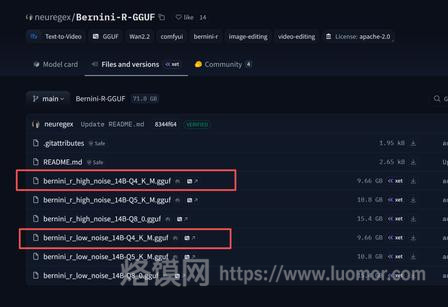
GGUF模型文件
3. 语音对口 S2V 说话视频工作流
专用节点:ComfyUI-WanBerniniS2V
工作流网盘打包:夸克 https://pan.quark.cn/s/433966637a74
三、模型分版本下载 + 精准存放路径
根目录统一路径:ComfyUI/models/
① FP8 标准版(16G/24G 显卡首选,画质 & 显存平衡)
HF 仓库:https://huggingface.co/Kijai/WanVideo_comfy_fp8_scaled/tree/main/Bernini
国内镜像加速:hf-mirror.com/Kijai/WanVideo_comfy_fp8_scaled/tree/main/Bernini
表格
| 文件 | 存放文件夹 |
|---|---|
| wan2.2_bernini_r_high_noise_fp8.safetensors | diffusion_models/ |
| wan2.2_bernini_r_low_noise_fp8.safetensors | diffusion_models/ |
| wan_2.1_vae_fp8.safetensors | vae/ |
| umt5_xxl_fp8_e4m3fn_scaled.safetensors | text_encoders/ |
② GGUF 极致量化版(12G 显存刚需,Q4/Q5_K_M)
主模型仓库:https://huggingface.co/neuregex/Bernini-R-GGUF
文件放入:models/diffusion_models/
- high 噪:
bernini_r_high_noise-14B-Q4_K_M.gguf - low 噪:
bernini_r_low_noise-14B-Q4_K_M.gguf
文本编码器 GGUF:https://huggingface.co/city96/umt5-xxl-encoder-gguf
③ 原版 FP16(24G 以上显卡,原生最高画质)
官方源:https://huggingface.co/Comfy-Org/Bernini-R
④ 锁脸增强 LoRA(必下,防止人脸崩坏)
LightX2V LoRA 放入 models/loras/
四、国内高速下载渠道(无魔法)
- HuggingFace 镜像:把原链接
huggingface.co替换为hf-mirror.com直下 - 夸克网盘全套整合包(节点 + 模型 + 工作流打包) 模型合集:
https://pan.quark.cn/s/6ec846f1f58d汉化便携 ComfyUI 整合包:https://pan.quark.cn/s/687953dddc64
五、导入后基础参数设置(避免报错 OOM)
- 分辨率:优先
720×480,最高不超960×544 - 帧数:单次生成建议 16~48 帧(24 帧 = 1 秒)
- CFG Scale:1.2~1.8,数值越高画面越容易闪烁
- 提示词规范(必须英文指令,模型原生仅支持英文) ✅ 视频换装示例:
Change the coat of the character to a black leather jacket, keep the original camera angle, body movement, background and lighting completely unchanged❌ 不要纯中文直接输入,会理解失效
六、常见报错快速解决
- 节点红色缺失:重启 ComfyUI,管理器重装 RH-Bernini 节点
- 找不到模型:核对文件夹名称,
diffusion_models不要写成 unet - 爆显存:切换 GGUF/Q4 量化,降低分辨率与总帧数
- 画面频闪:提升 low_noise 采样步数,CFG 调低至 1.3 以内
正文完
可以使用微信扫码关注公众号(ID:xzluomor)